SecureCRT's feature set allows you to map a button, command, or a mapped key to a Send String function so that a pre-configured command can be sent to the connected device. But what if the command you want to send requires a literal \ character to be sent? How do you configure the Send String text to include a \ character?
For instance, consider the following example command:
kubectl get pods -n xxx | grep -vE "([0-9]+)/\1|Completed"
If you place this exact text in a Send String definition for a button, command, or mapped key, the \1 portion of the command will disappear. This is because the \ character in a Send String value is reserved for escaping special send string commands, which does not include \1. Here is a list of the currently-supported send string commands:
\\ = Sends a \ character
\a = Sends the IPv6 address of the first adapter on the local machine (the client)
\b = Backspace character (ASCII 8/0x8/010, decimal/hex/octal)
\c = Sends the Computer Name of the local machine (the client)
\e = Escape (ASCII 33/0x1b/027, decimal/hex/octal)
\i = Sends the IPv4 address of the first adapter on the local machine (the client)
\l = Sends the Windows login name associated with the SecureCRT process running on the local machine (the client)
\m = Sends the MAC address of the first adapter on the local machine (the client)
\n = Newline/linefeed (ASCII 10/0xa/12, decimal/hex/octal)
\p = Pauses for 1 second
\r = Carriage return (ASCII 13/0xd/015, decimal/hex/octal)
\t = Tab (ASCII 9/0x9/11, decimal/hex/octal)
\u = Sends the username used to login to the remote server
\v = Pastes the clipboard contents to the active session window
\nnn = Sends an arbitrary octal code nnn
As seen in the above chart, to send a literal \ character as part of a Send String value, you use two consecutive \ characters, as in \\ .
You can also achieve sending a literal \ character by sending its octal equivalent \134 .
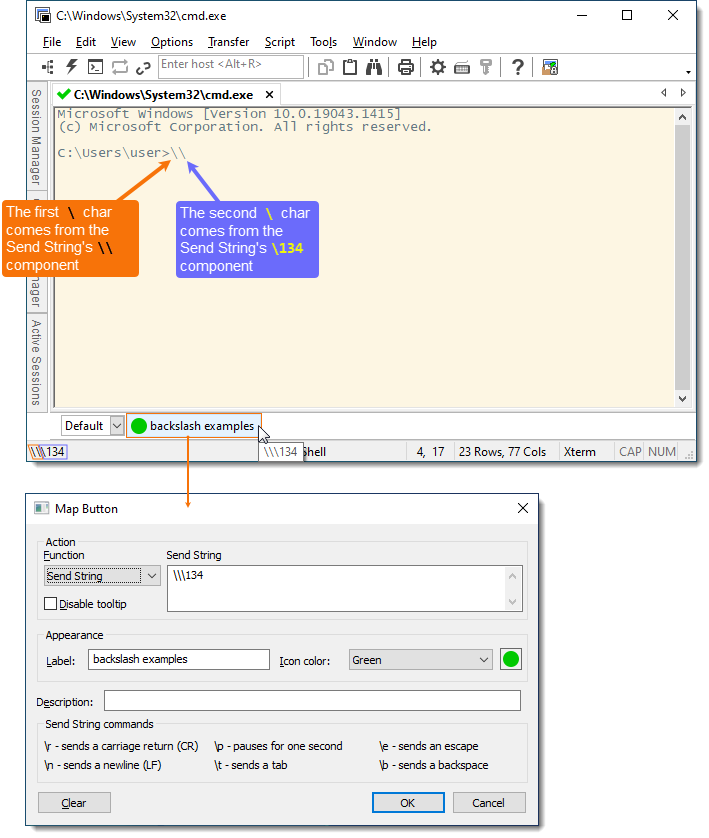
Circling back to the original example command, the Send String field would need to be set as follows in order to achieve sending a literal \1:
kubectl get pods -n xxx | grep -vE "([0-9]+)/\\1|Completed"
VanDyke Software uses cookies to give you the best online experience. Before continuing to use this site, please confirm that you agree to our use of cookies. Please see our Cookie Usage for details.
